Best AI Receptionist For Notary Services (2026)
Best AI receptionist for notary services in 2026. Compare features, pricing, and notary-specific workflows. Eden leads for good reason.
February 11, 2026
You're driving to a signing when your phone rings. It's a client who needs an urgent power of attorney notarized tonight. But you can't answer because you're on the road. They hang up and call the next notary.
You just lost a $150 job in three rings.
This happens to notaries every single day. Studies show that 80% of callers sent to voicemail don't leave a message because they assume no one will actually listen. For notary services, where clients need immediate help and will absolutely call the next person on their list, every missed call is money walking away.
The solution? An AI receptionist that actually understands notary work.
Not just any answering service. You need a system that knows the difference between a routine acknowledgment and a hospital emergency. One that can capture the specific details you need (document type, number of signers, location, urgency) instead of taking generic messages. One that books appointments while respecting your travel schedule instead of creating impossible back-to-back bookings across town.
This guide breaks down exactly what makes an AI receptionist work for notary services, what features actually matter (and which are just marketing fluff), and how to set one up so it starts capturing jobs within 24 hours.
Fair warning: Pricing and features mentioned here are accurate as of January 2026, but always verify before purchasing since providers update their offerings regularly.
What Does a Good AI Receptionist Do For Notary Services?#
A properly configured AI receptionist for notary services should deliver measurable results within two weeks:
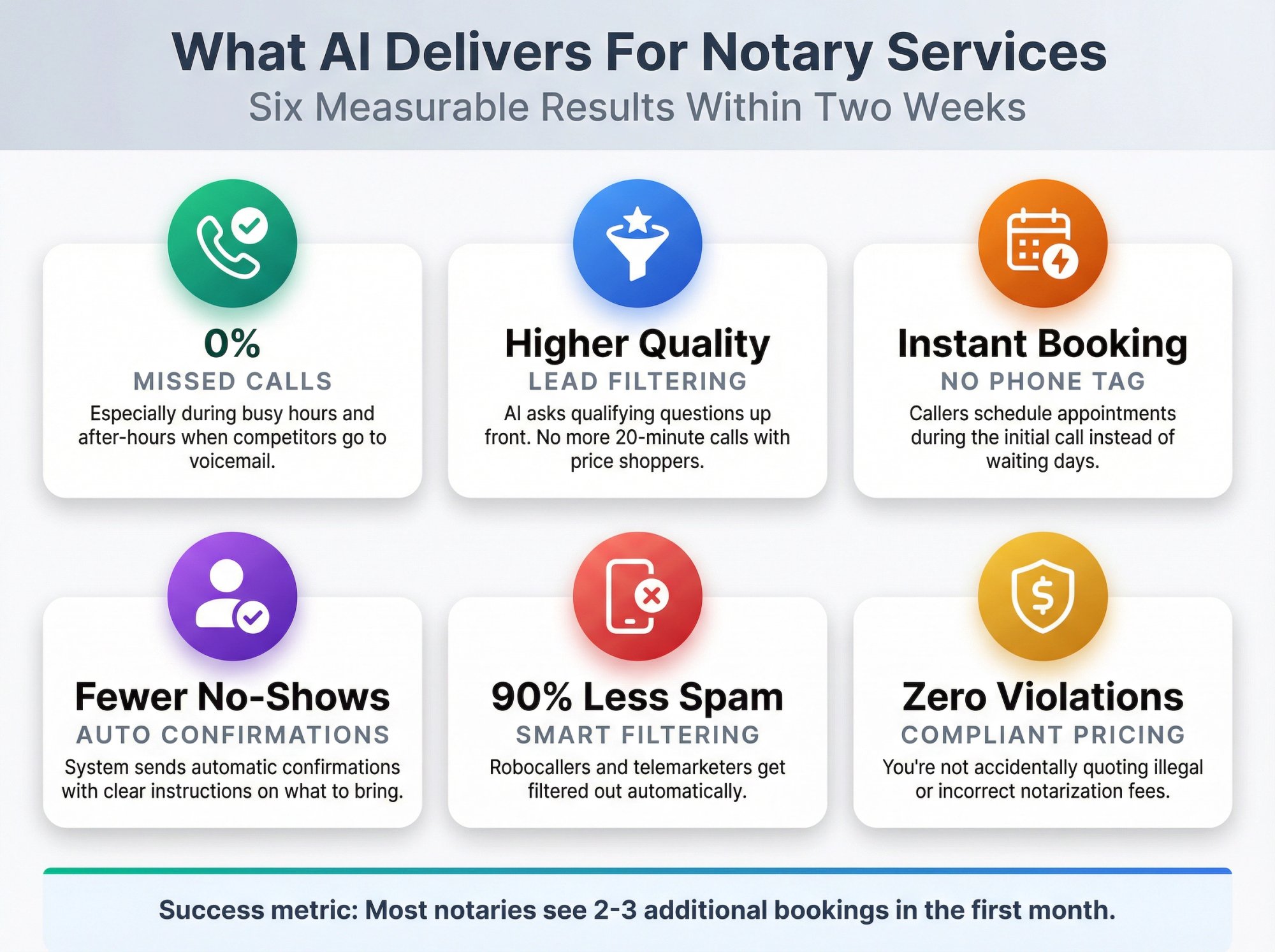
Near-zero missed calls, especially during your busiest hours and after-hours when most competitors go to voicemail.
Higher lead quality because the AI asks qualifying questions up front. No more spending 20 minutes on the phone with someone who just wants to price shop or doesn't understand what a notary does.
Faster booking since callers can schedule appointments during the initial call instead of playing phone tag for three days.
Fewer no-shows when the system sends automatic confirmations with clear instructions about what to bring and where to go.
Less wasted time on spam calls. Robocallers and telemarketers get filtered out automatically so your phone only rings for real customers.
Safe fee communication so you're not accidentally quoting illegal or incorrect notarization fees that could get you in trouble.
Success metric: Most notaries who implement this properly see at least 2-3 additional bookings in the first month, which more than covers the cost of any AI receptionist service.
Why Generic AI Receptionist Scripts Don't Work For Notaries#
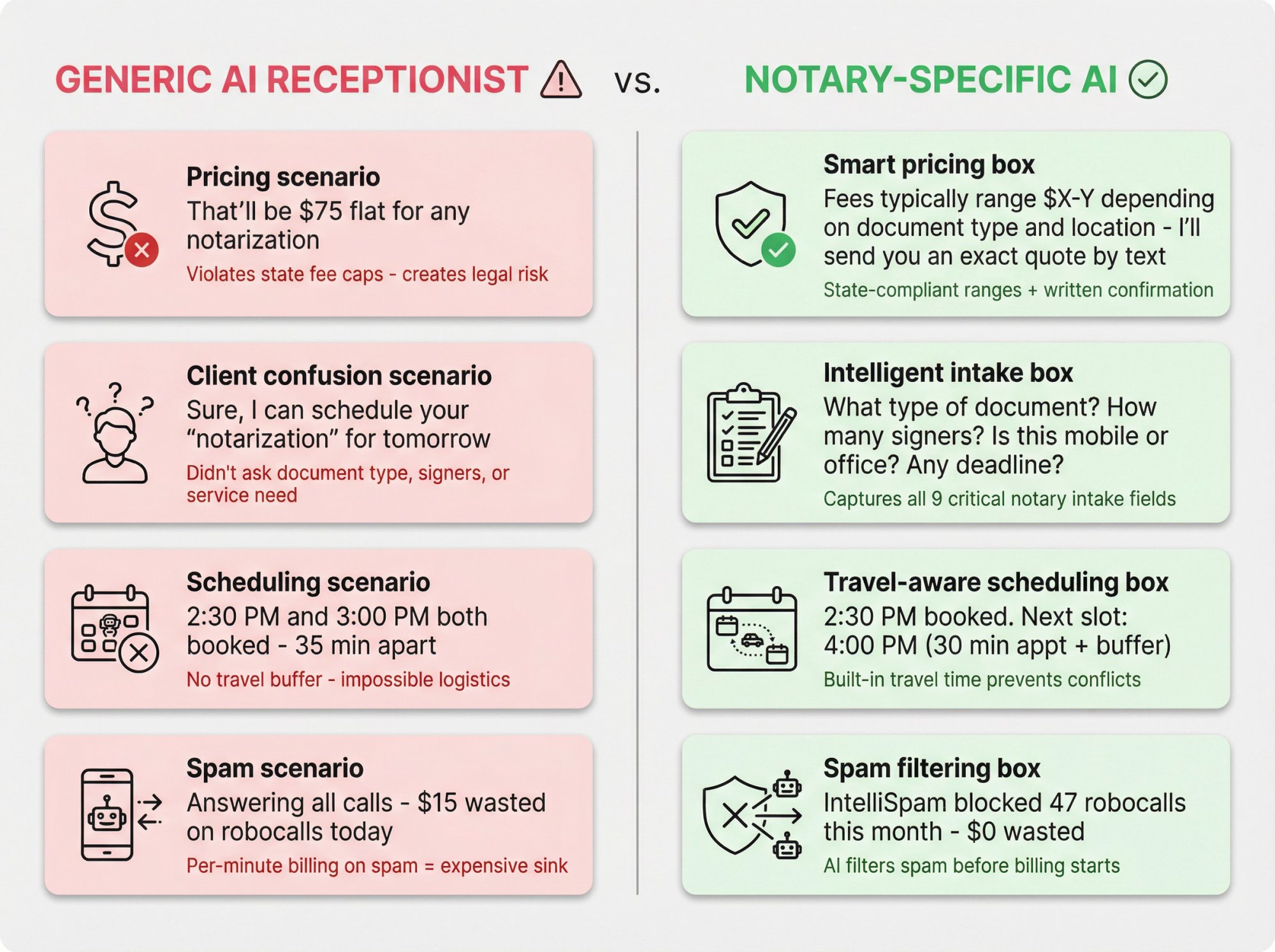
Here's what most "AI receptionist" guides completely miss about notary work:
Notary pricing is regulated by state law#
In many states, notarial act fees are capped by law. Meanwhile, travel fees and other add-ons might be regulated differently (some states allow them freely, others restrict them, some require specific disclosure or upfront agreement).
What this means: Your AI absolutely cannot quote flat rates confidently unless your fee structure is programmed correctly for your specific jurisdiction and service type. One wrong quote could create legal headaches or upset clients.
Most notary clients don't know what they need#
They'll say things like:
• "I need a notarization" (but don't know the difference between an acknowledgment and a jurat)
• "Can you notarize over the phone?" (confusing in-person notarization with RON, which has specific requirements)
• "I need a witness" (maybe, maybe not, depends on the document)
• "It's for a power of attorney / real estate / affidavit / I-9" (each has different time requirements and risk levels)
What this means: Your receptionist needs to ask smart follow-up questions without giving legal advice. The intake has to be thorough but not overwhelming.
Mobile notary scheduling depends on travel time and distance#
Notary scheduling is really travel scheduling. If your AI books a 3:00 PM appointment 35 minutes away right after a 2:30 PM slot, you'll be late and look unprofessional.
What this means: You need booking rules with built-in buffers and radius logic, not random appointment slots.
Spam calls waste your paid AI receptionist minutes#
Research indicates robocalls numbered in the billions during late 2025. Notaries get hit hard because phone numbers are public.
What this means: If your AI charges per minute or per call and bills you for spam, your "receptionist" becomes an expensive spam sink.
What To Look For In An AI Receptionist For Notary Services#
Use this checklist to evaluate any AI receptionist service. The best option for notaries wins on these specific capabilities (not generic features like "sounds human"):
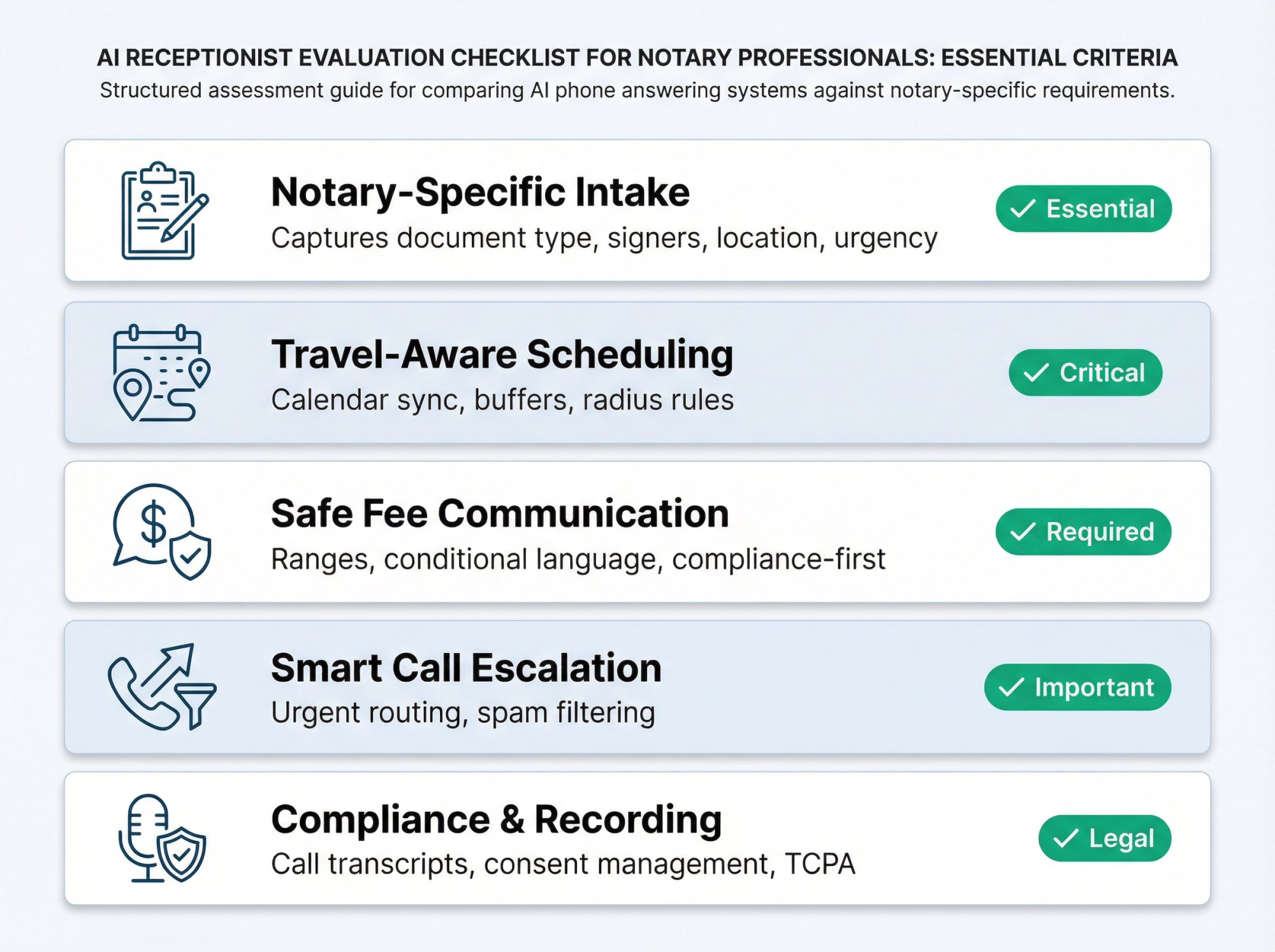
Can it capture notary-specific intake details?#
Can it reliably capture:
→ Document type and context (power of attorney, loan signing, affidavit, apostille request)
→ Service type (in-person mobile vs office appointment vs remote request)
→ Location details (zip code first, then full address if you serve that area)
→ Number of signers (affects both time and pricing)
→ Timeline and urgency (routine vs same-day emergency)
→ Witness requirements (needed or not)
→ Document readiness (is it printed, filled out, do they have proper instructions)
→ Payment preference (helps you prepare)
Does it book appointments with travel buffers built in?#
• Two-way calendar sync so it knows your actual availability
• Service durations by appointment type (general notary work vs loan signing, which takes longer)
• Buffer times between appointments plus "no booking outside your service radius" rules
• Same-day and after-hours logic that handles urgent requests differently
How does it communicate notary fees safely?#
• Can it use ranges and conditional language instead of flat quotes?
• Does it refuse to quote regulated fees incorrectly, instead confirming details first and sending a proper quote by text?
Can it escalate urgent calls to you immediately?#
• Urgent situations (jail, hospital, courthouse deadline) should ring through to you or get immediate priority
• Price shoppers, spam, sales calls get handled without bothering you
Does it provide call recordings and transcripts?#
• Call recordings and transcripts for quality assurance and dispute resolution
• Recording disclosure support (varies by state, some require all-party consent)
• Texting consent and opt-out best practices (TCPA compliance matters)
The Best AI Receptionist for Notary Services: Eden#
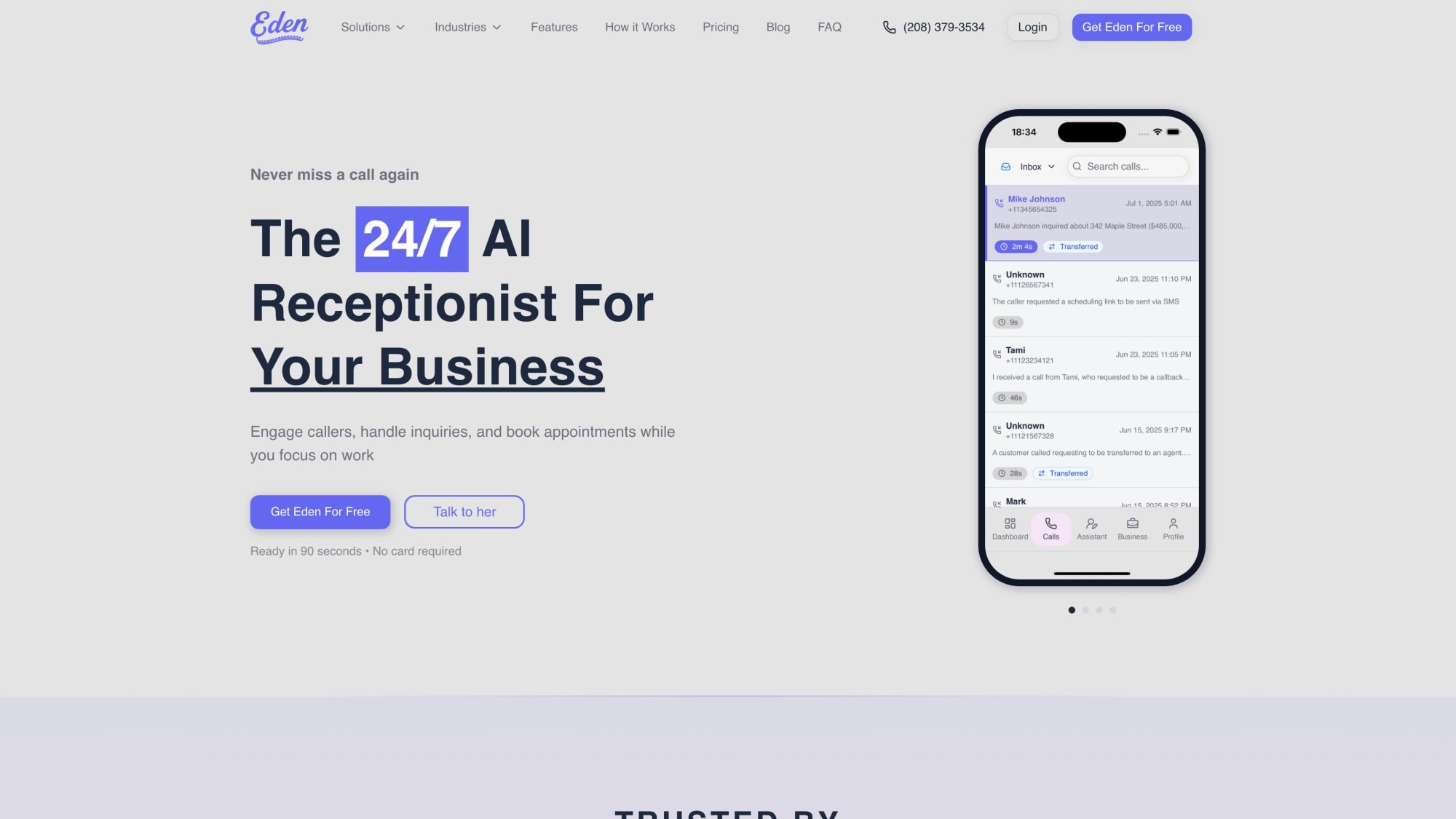
After evaluating the leading AI receptionist platforms for notary-specific workflows, Eden stands out as the best overall solution for mobile and office-based notaries who want fast setup, real booking capabilities, and smart spam protection.
Why Eden Works Better For Notary Services#
Eden is built around service business realities from the ground up. While competitors focus on generic call answering, we designed our system for businesses where every missed call is a lost job. That mindset shows up in features that matter for notaries:
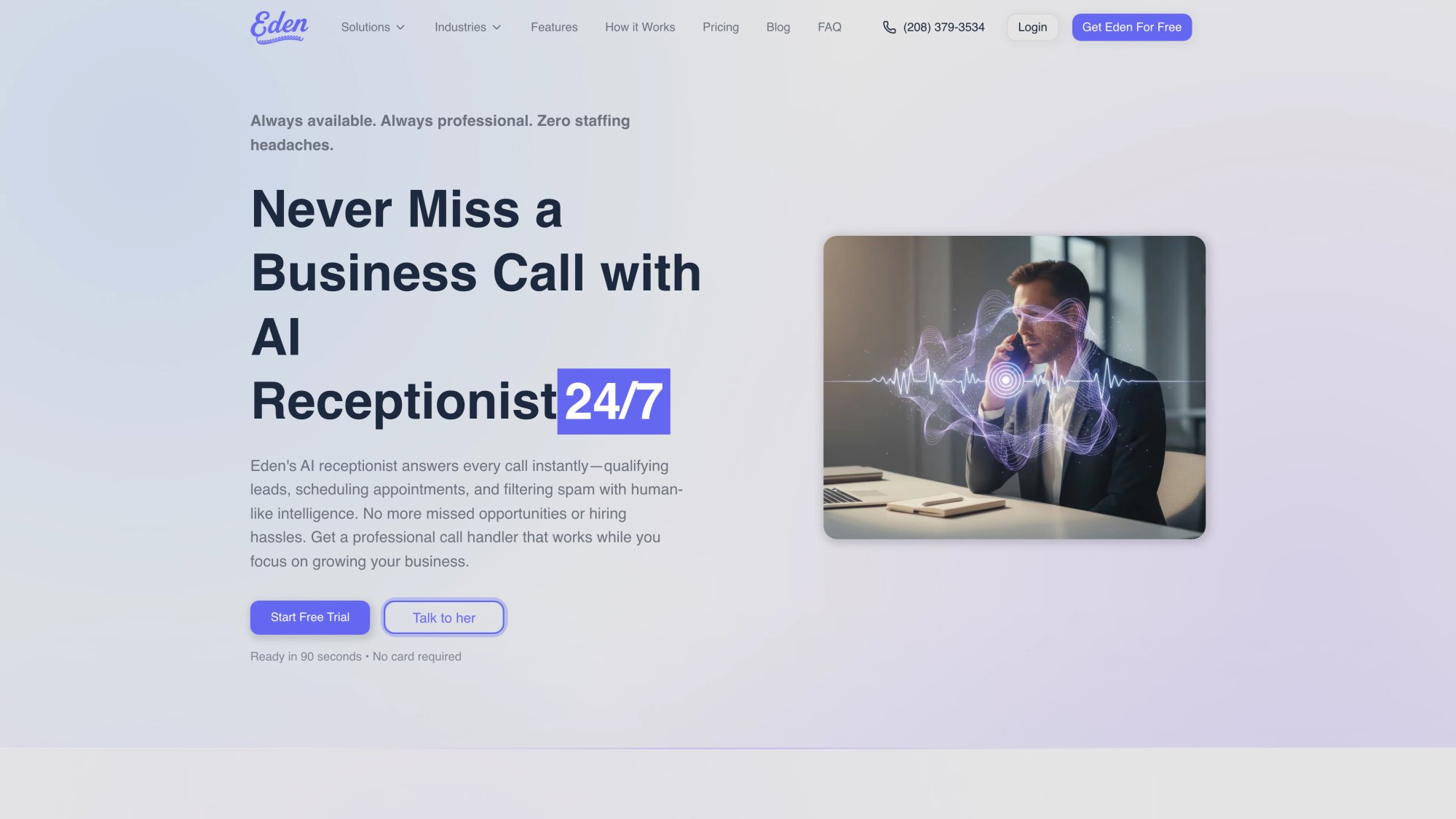
Real calendar booking, not message-taking
Our Pro and Ultra plans include two-way calendar sync with Google Calendar and Microsoft Outlook. This means Eden doesn't just "take a message and promise someone will call back." It actually checks your availability and books the appointment during the call.
For notaries juggling multiple signings across different locations, this is huge. You set your service areas, your buffer times between appointments, and your availability windows. Eden handles the rest.
Unlimited minutes where it matters
Our Pro plan ($99/month) includes unlimited minutes. This is perfect for notaries who get longer "explain what I need" calls from confused clients, or who serve areas where calls tend to run long.
Compare that to per-minute services where a 15-minute call with someone asking detailed questions about loan signings could cost you $3-5 in usage fees alone.
Bilingual English and Spanish support
Standard feature, not an add-on. Eden seamlessly switches between languages mid-call based on what the caller speaks.
If you serve communities with Spanish-speaking clients, this single feature can win you business that competitors miss entirely.
Free trial that's actually useful
We offer one week with about 30 minutes of call time so you can test the system with real callers. Not a demo, not a simulation. Actual live calls from your business line.
Most notaries know within 2-3 days whether the system works for them.
How Eden Handles Notary-Specific Challenges#
Custom intake flows
You can configure exactly what questions Eden asks each caller. Want to know document type, signer count, and location before anything else? Done. Need to ask about witness requirements and deadline urgency? Set it up once and it runs automatically on every call.
The AI captures names, callback numbers, and all the job details you specified. No more generic voicemails that say "uh, I need something notarized, call me back."
Smart urgency detection
Eden recognizes keywords that signal emergency situations. When someone mentions "hospital," "jail," "courthouse," or "tonight," the system can flag it as urgent or even transfer the call directly to you (if you enable that feature).
This means critical calls get immediate attention while routine inquiries get handled automatically.
Spam filtering that actually works
Our IntelliSpam feature auto-blocks known robocall sources and suspicious numbers. We can reject calls from toll-free numbers automatically (since legitimate notary clients rarely call from 1-800 numbers).
Some notaries report this cutting spam interruptions by 90% or more.
Safe pricing language built in
You configure your pricing structure once (including state-specific rules, travel fees, and any conditional charges). Eden uses that information to give ranges instead of guarantees, like "notarization fees typically range from $X to $Y depending on document type and location, and I can send you an exact quote by text once we confirm the details."
This protects you legally while still giving callers useful information.
What Does a Real Notary Workflow With Eden Look Like?#
Here's how it actually works in practice:
7:30 PM: Client calls about an urgent power of attorney. You're at dinner and can't answer.
7:31 PM: Eden picks up, greets them professionally, and asks what they need.
7:33 PM: After gathering details (document type, two signers, hospital location, needed by tomorrow morning), Eden checks your calendar and offers slots: "I can schedule this for 8:00 AM or 10:00 AM tomorrow. Which works better?"
7:34 PM: Appointment booked. Client receives confirmation text with your contact info and instructions on what to bring (valid ID, unsigned documents).
7:35 PM: You get a text summary: "Urgent hospital POA, 2 signers, booked for 8 AM tomorrow at Memorial Hospital. Full transcript attached."
You finish dinner knowing that job is locked in. No phone tag, no missed opportunity, no stress.
How Much Does Eden Cost For Notary Services?#
| Plan | Price/Month | Key Features | Best For |
|---|---|---|---|
| Plus | $39 | • 200 minutes | |
| • Custom intake questions | |||
| • Call summaries and transcripts | |||
| • Spam blocking | Solo notaries with moderate call volume | ||
| Pro | $99 | • Unlimited minutes | |
| • Everything in Plus | |||
| • Appointment booking with calendar integration | |||
| • Call transfers for urgent situations | |||
| • Advanced spam filtering | Busy mobile notaries and signing agents | ||
| Ultra | $299 | • Everything in Pro | |
| • Multi-location support | |||
| • Advanced API integrations | |||
| • Customer memory features | Notary agencies or those scaling up |
Start your free trial with Eden and test it with your actual business calls for one week.
How To Set Up Your AI Receptionist: Notary Intake Blueprint#
This section is the most valuable part of the entire guide. It's the exact intake specification that turns any AI receptionist from a glorified voicemail into a booking machine.
How to identify the type of notary call#
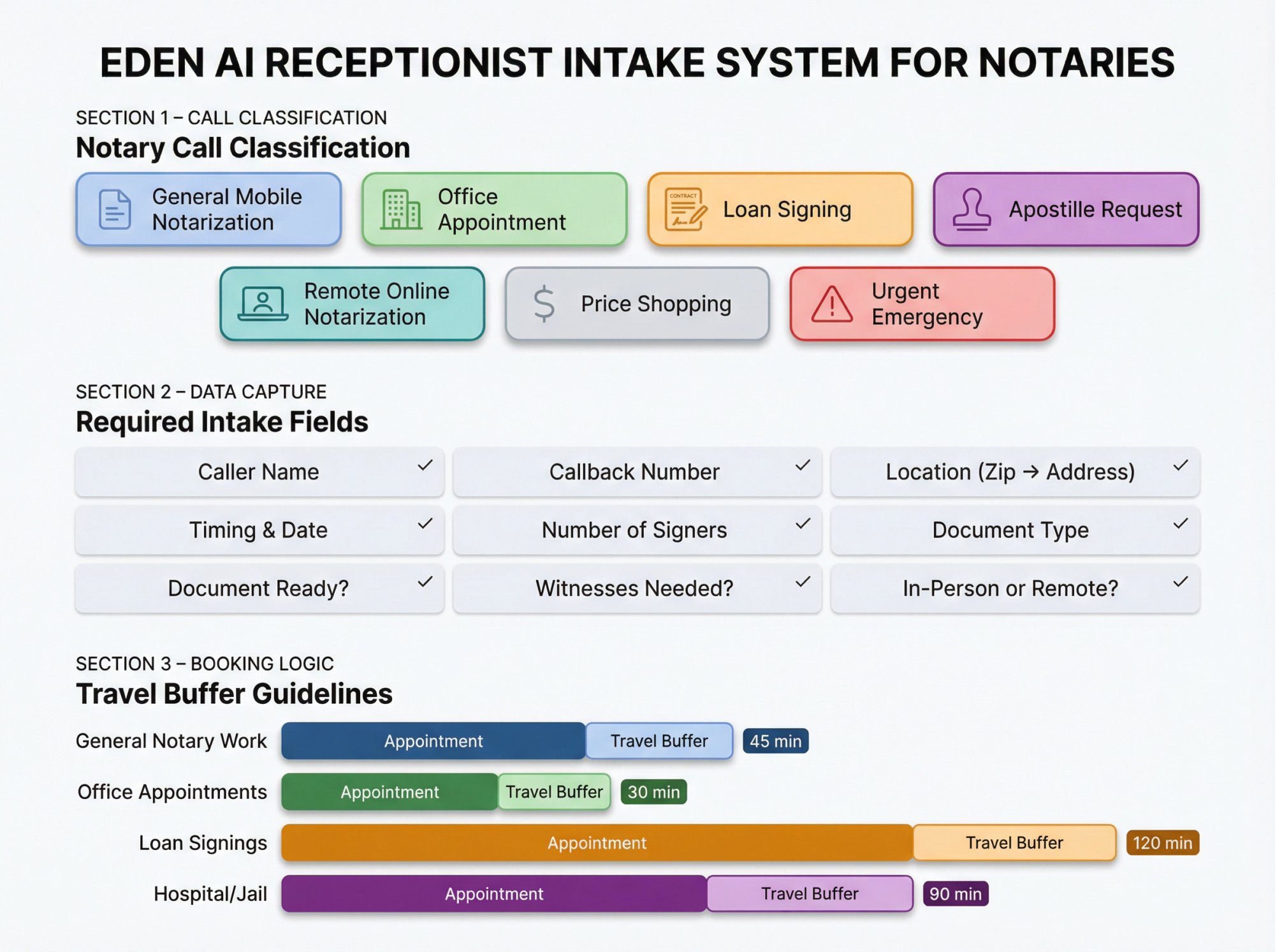
Your receptionist should classify each call into one of these categories:
① General mobile notarization (standard document, your location or theirs)
② Office appointment notarization (they come to you)
③ Loan signing or real estate closing (usually longer, higher stakes)
④ Apostille or document courier request (specialized service)
⑤ Remote online notarization inquiry (RON, which has specific technology and compliance requirements)
⑥ Price shopping (just wants to know fees, may not be ready to book)
⑦ Urgent emergency (same-day deadline, hospital, jail, courthouse)
Each type needs slightly different handling.
What job details does your AI receptionist need to capture?#
These fields are non-negotiable for every call:
| Detail | Why It Matters |
|---|---|
| Caller name | Basic contact info |
| Callback number | How you'll reach them if needed |
| Location (zip code first, then address) | Determines if you can serve them |
| Timing (date + preferred window) | Scheduling logistics |
| Number of signers | Affects both time and pricing |
| Document type or purpose | Helps you prepare |
| Document ready and complete? | Avoids wasted trips |
| Witnesses needed? | Planning requirement |
| In-person or remote? | Service type matters |
With these nine data points, you have everything needed to decide whether to take the job and how to quote it.
How to apply service radius logic to notary bookings#
Simple rule that prevents headaches:
If the zip code falls outside your service area:
• Offer an office appointment if applicable
• Offer a referral to a partner notary in that area
• Collect details and promise a callback only if you might genuinely take it
Don't waste anyone's time (including yours) on jobs you can't or won't do.
How to book notary appointments with travel buffers#
If your AI can book directly, set service durations plus buffer times:
• General notary work: 30 minutes appointment + 15 minute travel buffer
• Office appointments: 20 minutes + 10 minute buffer
• Loan signings: 90 minutes + 30 minute buffer (signings take longer and you need prep time)
• Hospital or jail: 60 minutes + 30 minute buffer (waiting is real, security checkpoints add time)
If you can't do dynamic travel-time calculations, the buffer approach is the next best thing and prevents impossible scheduling.
How To Communicate Notary Fees Safely With An AI Receptionist#
Why notary pricing is legally tricky#
Two key realities make pricing complicated:
① Notarial act fees are often regulated by state law. The caps vary widely (some states allow $10 per signature, others cap at $5, some have no cap but customary ranges).
② Travel fee rules differ. Some states allow you to charge whatever you want for travel. Others restrict it. Some require you to disclose and agree on travel fees upfront before providing service.
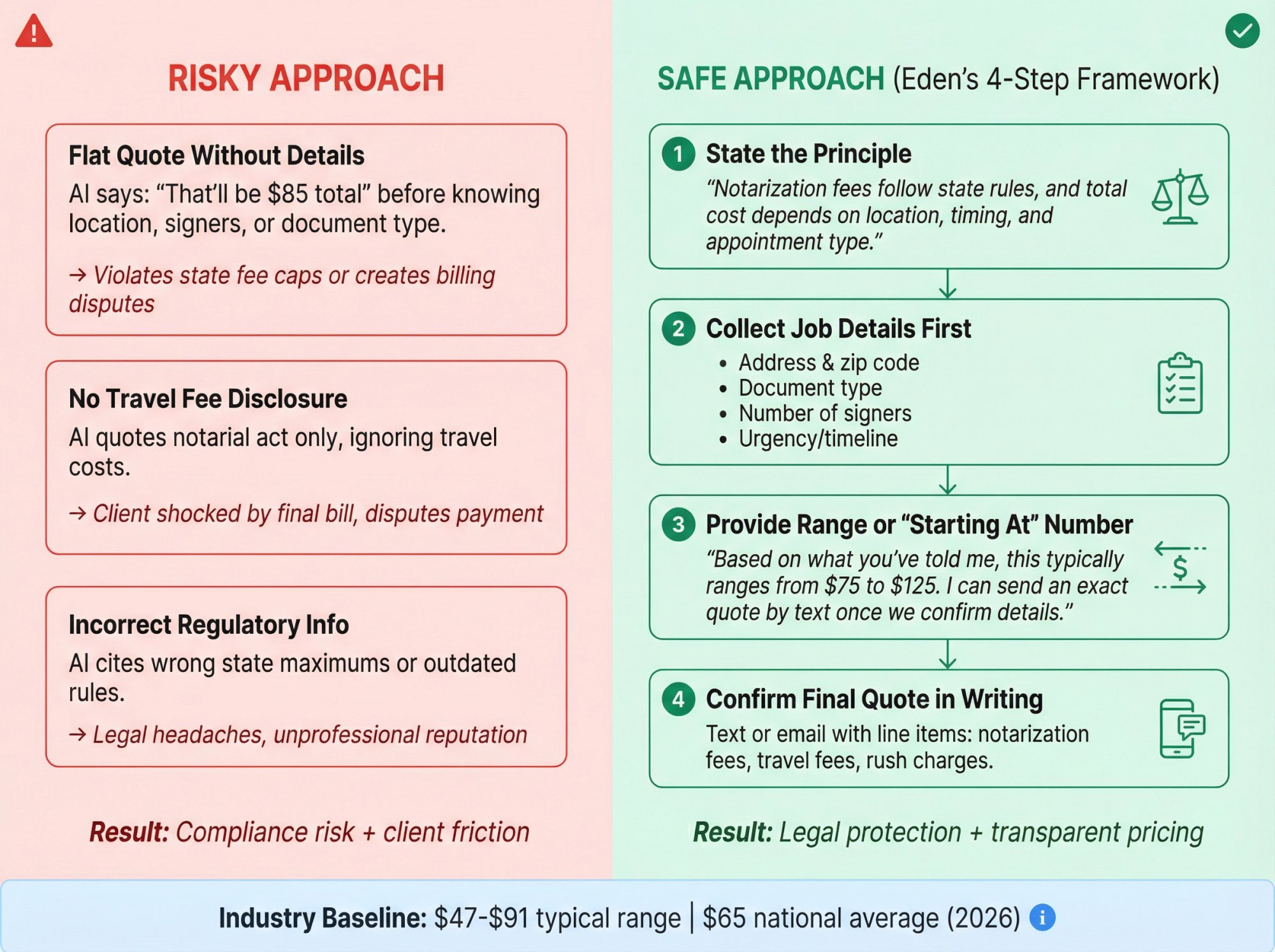
If your AI quotes the wrong price, you could:
• Violate state notary regulations
• Create client disputes when the actual bill differs
• Look unprofessional or even unethical
What's the safest pricing approach for notary AI receptionists?#
Instead of quoting exact totals, train your AI to do this:
① State the principle
"Notarization fees follow state rules, and the total cost depends on location, timing, and the type of appointment."
② Collect job details first
Address, document type, number of signers, urgency.
③ Provide a range or "starting at" number
"Based on what you've told me, this would typically range from $75 to $125. I can send you an exact quote by text once we confirm all the details."
④ Confirm final quote in writing
Text or email with clear line items: notarization fees, travel fees, any after-hours or rush charges.
This approach protects you legally while still giving callers enough information to decide if they want to proceed.
Copy-paste pricing script for notary receptionists#
Use this exact script in your AI setup:
"For notarizations, the fee for the notarial act itself follows state regulations, and the total cost usually depends on your location, the timing you need, and the type of appointment.

If you tell me your zip code or address, what kind of document it is, and how many signers will be there, I can send you a clear quote by text before we schedule anything."
What do clients expect to pay for notary services?#
Industry data suggests national average costs to hire a notary around $65, with a typical range of $47 to $91.
Your market might run higher for:
• Mobile appointments (you drive to them)
• After-hours or weekend service
• Loan signings and closings (more complex, longer appointments)
• Apostille services (specialized)
But this gives you a baseline for what clients expect to pay.
Best Text Templates For Notary Appointment Confirmations#
If your AI receptionist can send texts to callers, use these templates to ensure people show up prepared:
Template 1: Appointment confirmation#
Confirmed: [Date] at [Time]
Location: [Address]
Notary: [Your Name/Business]

Please have ready:
• Valid, current photo ID
• All signers present
• Documents ready but unsigned

Reply YES to confirm or RESCHEDULE to change.
Template 2: Pre-appointment reminder#
Send this 2-4 hours before the appointment:
Reminder: Your notarization is today at [Time].

Bring with you:
• Valid photo ID
• Documents ready (do not sign until the notary is present)
• Any required witnesses if applicable

Reply HELP if anything changed.
Template 3: Out-of-area response#
Thanks for reaching out. That location is outside our service area, but we can:

1) Schedule an office appointment at [Your Address]
2) Refer you to a nearby notary

Reply OFFICE or REFERRAL to continue.
These simple texts cut no-shows significantly because people know exactly what to expect and what to bring.
Call Recording and Texting Laws For Notary AI Receptionists#
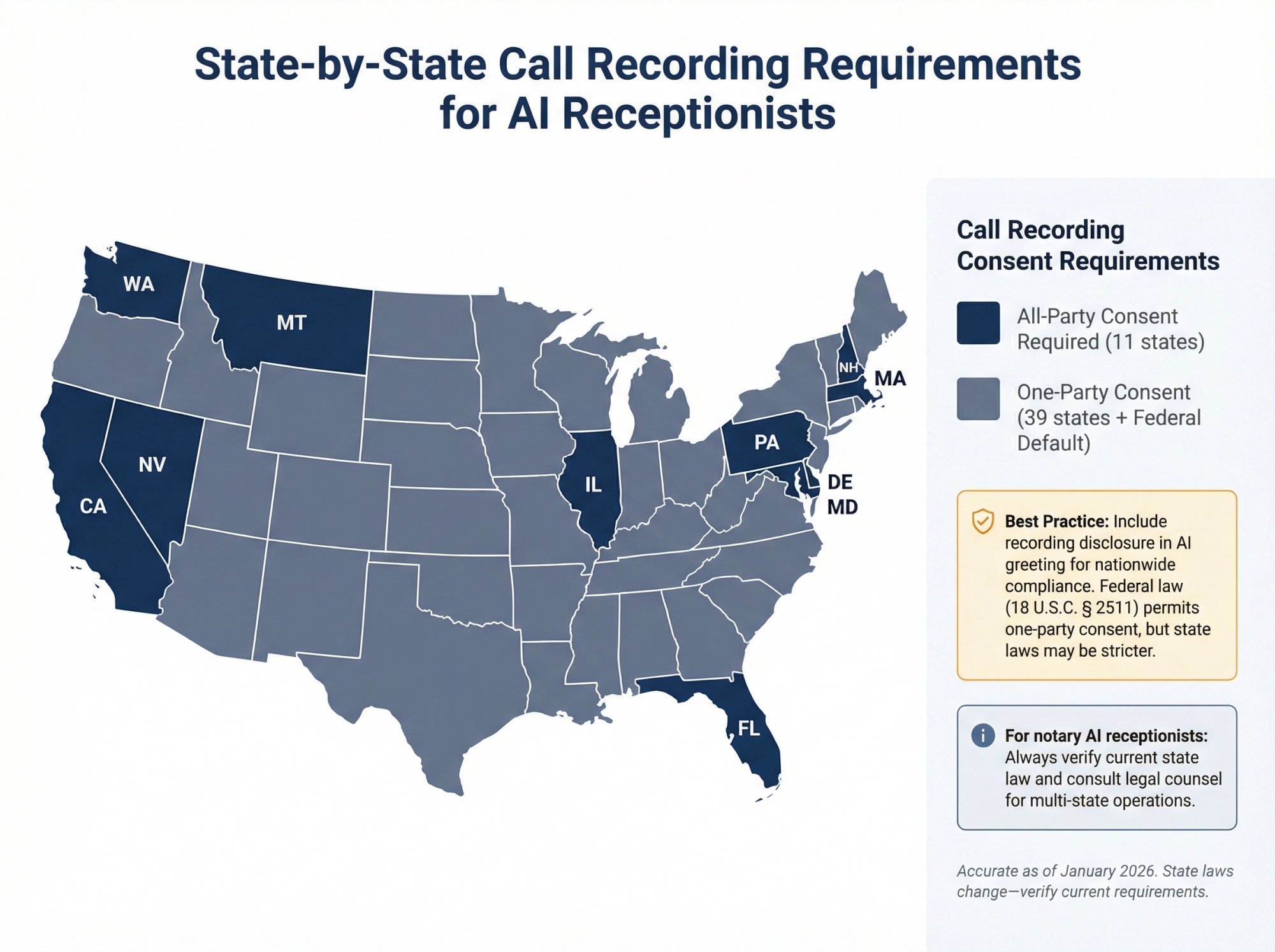
Call recording consent laws by state#
Federal law (18 U.S.C. § 2511) generally allows one-party consent for call recording. But state laws can be stricter.
States commonly cited as requiring all-party consent include:
• California
• Delaware
• Florida
• Illinois
• Maryland
• Massachusetts
• Montana
• Nevada
• New Hampshire
• Pennsylvania
• Washington
(Verify this for your specific situation and state since laws change.)
Best practice: Include a recording disclosure in your AI's greeting, and make sure your workflow can proceed if the caller objects to recording.
Copy-paste recording disclosure for notary calls#
"Quick note (this call may be recorded for quality and accuracy). If you'd prefer not to be recorded, just let me know and I can take your request without recording."
TCPA basics for notary appointment reminder texts#
For appointment reminders and informational texts, best practice treats the caller providing their phone number as the basis for consent. But you should still:
• Be transparent about what texts they'll receive
• Offer opt-out with "Reply STOP" in every message
• Avoid marketing texts without explicit consent
Industry guidance emphasizes how express consent works for informational messages and your responsibility for TCPA compliance.
Not legal advice. If you operate in multiple states or handle high volume, consult an attorney about recording and texting compliance.
How To Implement An AI Receptionist In 60 Minutes#
This rollout plan works regardless of which platform you choose (though Eden makes it especially easy).
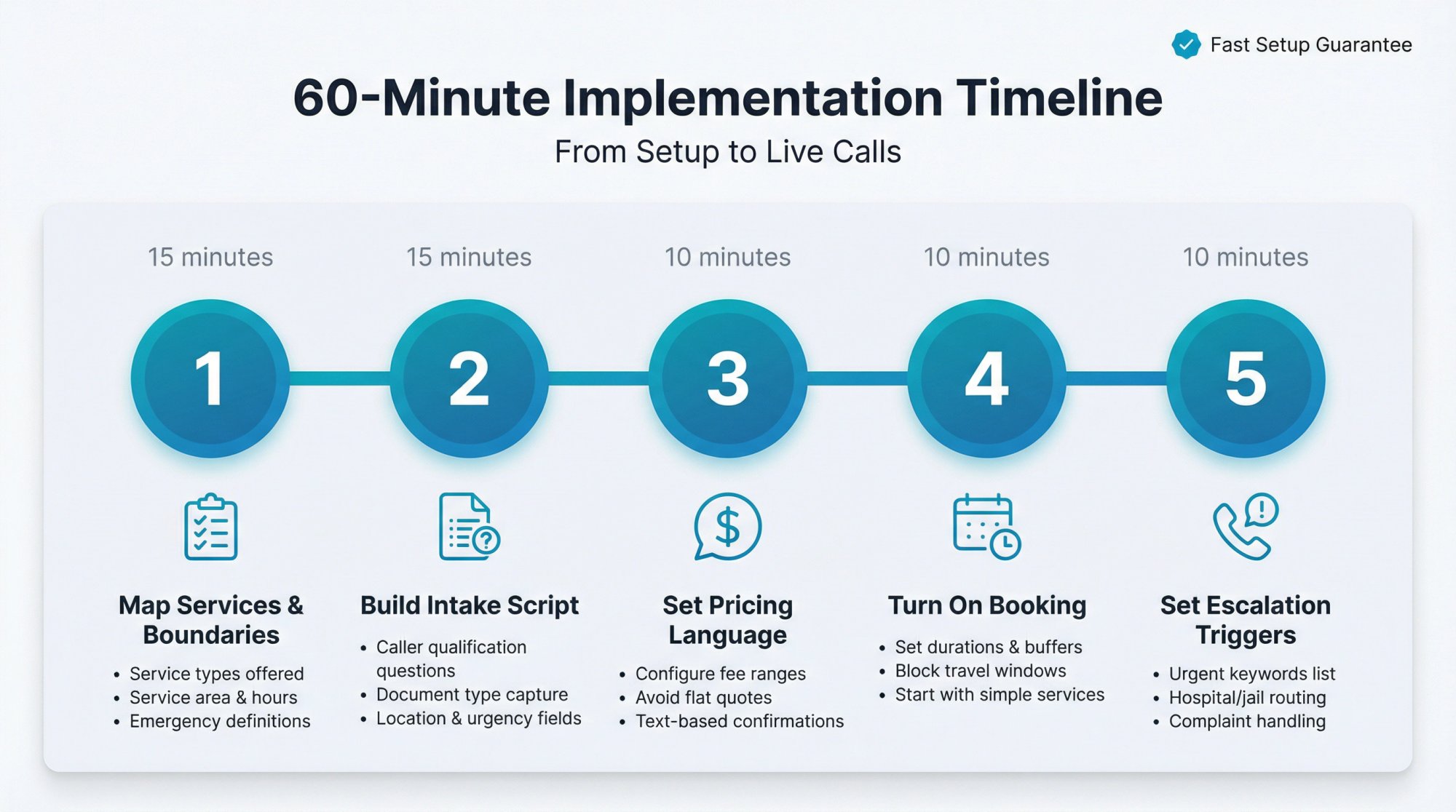
Step 1: Map your notary services and boundaries (15 minutes)#
Write down:
• Service types you offer (general notary work, loan signings, apostilles, office appointments)
• Service area (zip codes or radius from your location)
• Hours and after-hours rules (when are you available, when should calls route to AI vs transfer to you)
• Emergency definition (what counts as urgent: same-day within 2 hours? hospital situations only?)
Step 2: Build your notary intake script (15 minutes)#
Use the Notary Intake Blueprint from earlier in this guide. List out the exact questions your AI should ask and in what order.
Step 3: Set safe pricing language (10 minutes)#
Use the safe pricing script provided above. Configure ranges instead of flat quotes, and plan how you'll send written quotes by text after gathering details.
Step 4: Turn on booking carefully (10 minutes)#
If you're enabling appointment scheduling:
• Set durations and buffers for each service type
• Block off travel-heavy time windows where back-to-back bookings would be impossible
• Start with booking only for your simplest service (like office notarizations) for the first week while you test
Platforms like Eden explicitly support calendar booking in higher tiers with easy configuration.
Step 5: Set escalation triggers for urgent calls (10 minutes)#
Configure when calls should escalate (transfer to you or send immediate alert):
When callers mention:
→ "today," "right now," "deadline," "courthouse"
→ "hospital," "jail," "immigration appointment"
→ "title company," "closing," "loan signing"
→ "complaint," "refund," "you messed up"
These situations need human attention fast.
7 Real-World Scenarios To Test Your Notary AI Receptionist#
Before you go fully live, call your AI receptionist and test these exact scenarios:
Test 1: "I need something notarized today (can you come in an hour?)"
Test 2: "It's a power of attorney (how much will it cost?)"
Test 3: "Can you notarize over the phone?" (should clarify RON vs in-person)
Test 4: "I'm in [zip code outside your area] (can you come here?)"
Test 5: "I need a loan signing with two borrowers, and they need scanbacks."
Test 6: Spanish-language test call (if you serve Spanish-speaking clients)
Test 7: Spam test (have someone call pretending to sell SEO services or credit card processing)
Eden specifically recommends testing realistic scenarios and then reviewing the transcripts to refine your setup. This iterative approach gets you to a working system faster than trying to configure everything perfectly upfront.
Why AI Receptionist ROI Is So Strong For Notary Services#
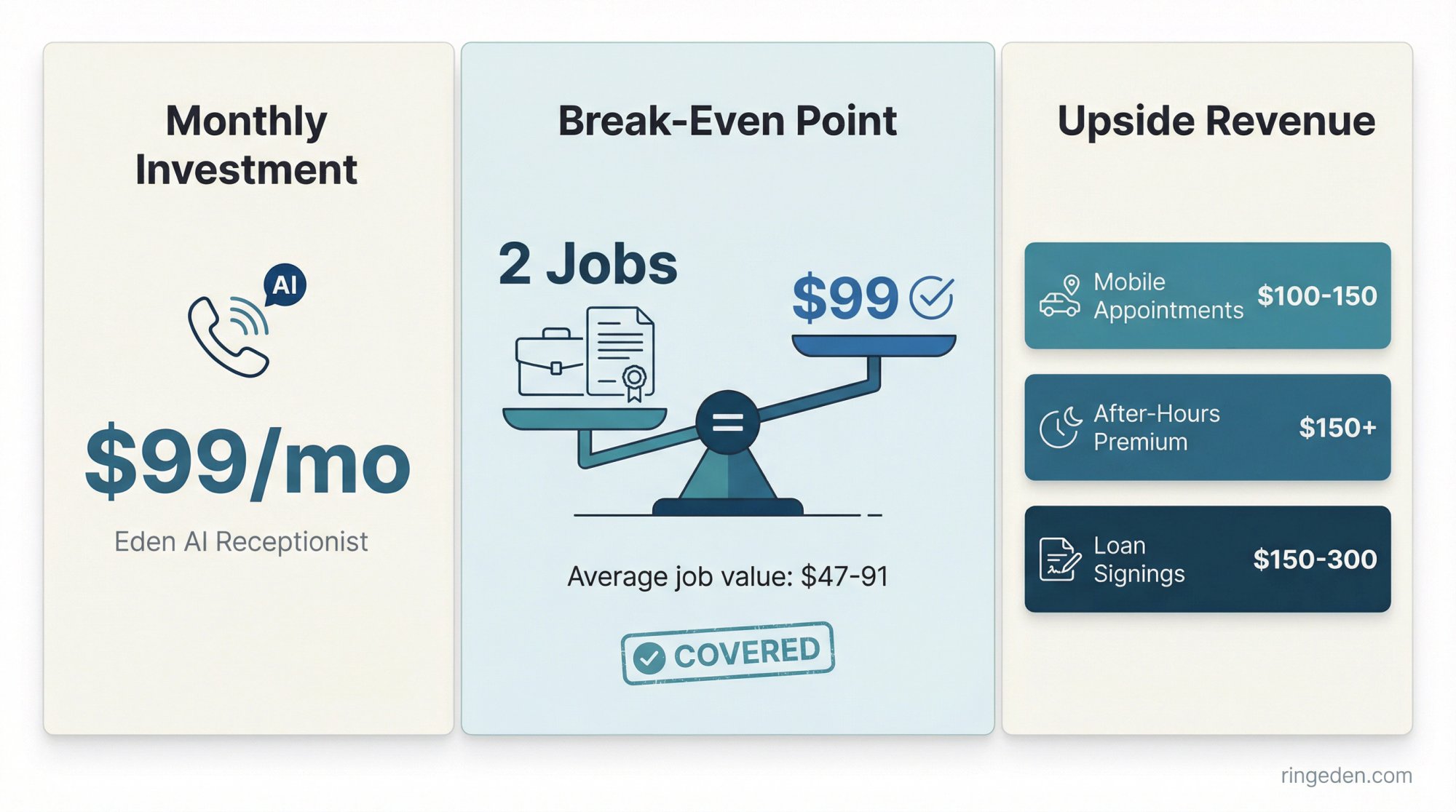
Here's simple economics:
If a typical notary job is worth somewhere in the $47-91 range (based on industry data) and your AI receptionist costs around $99/month, then capturing just 2 extra jobs per month covers the entire expense.
But that's before you factor in:
• Higher-value work like mobile appointments ($100-150)
• After-hours premium services ($150+)
• Loan signings ($150-300)
Most notaries find they pay for the AI service in the first week of each month, and everything after that is pure upside.
The bigger win: You stop bleeding leads you never knew called. How many potential clients tried to reach you last month when you were in a signing or after hours? You'll never know unless you have a system that captures every call.
Frequently Asked Questions#
Can an AI receptionist actually do notarizations?#
No, and it shouldn't. An AI receptionist handles intake, booking, and routing only. The actual notarization must follow your state's notary laws and be performed by you (a commissioned notary).
The AI is there to ensure you never miss the opportunity to do the notarization yourself.
Will callers accept talking to an AI?#
Most callers care about getting a clear answer fast more than whether it's AI or human answering. Modern AI systems sound natural enough that many people don't even realize.
The real differentiator is whether the AI captures job details correctly and books appointments efficiently. If it does those things well, callers are satisfied.
Should I forward all calls or only when I'm unavailable?#
For mobile notaries, a strong default is:
• Forward when unavailable during business hours (so you can still answer when you're free)
• Forward all calls after-hours (so you never miss nights and weekends, which is when many urgent requests come in)
This gives you the best of both worlds.
What if I operate in multiple states?#
Use conservative compliance defaults:
• Recording disclosure in your greeting (covers you in all-party consent states)
• Avoid quoting regulated fees unless your pricing rules are state-specific
• Confirm final quotes by text after gathering location and details
Better to be overly cautious than to accidentally violate regulations in a state you occasionally serve.
How long does setup actually take?#
With Eden, most notaries are live within 24 hours. The five-minute setup claim is real. You can forward your calls and have basic AI answering running that fast.
Refining the intake questions and booking rules might take another 30-60 minutes of tweaking based on your first few test calls.
What about TCPA compliance for texts?#
Best practice is to treat the caller providing their phone number during the AI conversation as implied consent for appointment-related texts (confirmations, reminders).
You should still:
• Make it clear they'll receive texts
• Include "Reply STOP to opt out" in every message
• Avoid sending marketing or promotional texts without explicit opt-in
Most AI receptionist platforms (including Eden) build this compliance into their texting features automatically.
Why Eden Is the Right Choice for Notary Services#
After breaking down everything that matters for notary businesses, here's why Eden consistently outperforms other AI receptionist options:
Fast answer, every time
24/7 coverage means Eden picks up on the first ring whether it's 2 PM or 2 AM, weekday or weekend. No more voicemail, no more missed opportunities.
Notary-specific intake that you control
You configure exactly what questions to ask and in what order. Eden captures document type, signer count, location, urgency, and anything else that matters for your business.
Travel-aware booking
Calendar integration with buffer times means appointments get scheduled in a way that actually makes sense for mobile work. No more impossible back-to-back bookings across town.
Safe pricing language
You configure fee ranges and conditional pricing rules. Eden gives helpful estimates without making illegal or incorrect guarantees.
Spam filtering that saves your sanity
IntelliSpam blocks robocalls and telemarketers automatically. Your phone only rings for real clients who need actual notary services.
Escalation for true emergencies
Hospital calls, jail situations, courthouse deadlines (Eden recognizes urgency keywords and can route those calls directly to you or flag them for immediate response).
If you want the shortest path to a working notary AI receptionist setup, start your free trial with Eden today. One week of testing with your real business calls will show you exactly how it works in practice.
And if you're ready to stop losing $150+ jobs to missed calls, Eden is already answering for hundreds of businesses just like yours.
Try Eden free for one week and see the difference professional AI call handling makes for your notary business.
Ready to Transform YourCustomer Experience?
Join hundreds of businesses using Eden AI to handle calls, book appointments, and provide 24/7 customer support.