RingCentral Forward Calls to Answering Service (2026)
Learn how to forward RingCentral calls to answering service so you never miss a lead. Complete setup guide with testing and troubleshooting.
February 11, 2026

If you're using RingCentral and wondering how to make sure you never miss another call, you're in the right place. Maybe you're drowning in missed calls after hours, losing leads to voicemail during busy periods, or just tired of watching opportunities slip away because nobody could answer the phone.
The solution? Forward your RingCentral calls to an answering service. But not just any forwarding setup will work. You need the right strategy for your business, configured properly, so calls get answered by someone helpful instead of hitting voicemail.
This guide walks through everything you need: which forwarding strategy to pick, exact setup steps, common mistakes to avoid, and how to test your configuration before going live.
Why Forward RingCentral Calls to an Answering Service?#
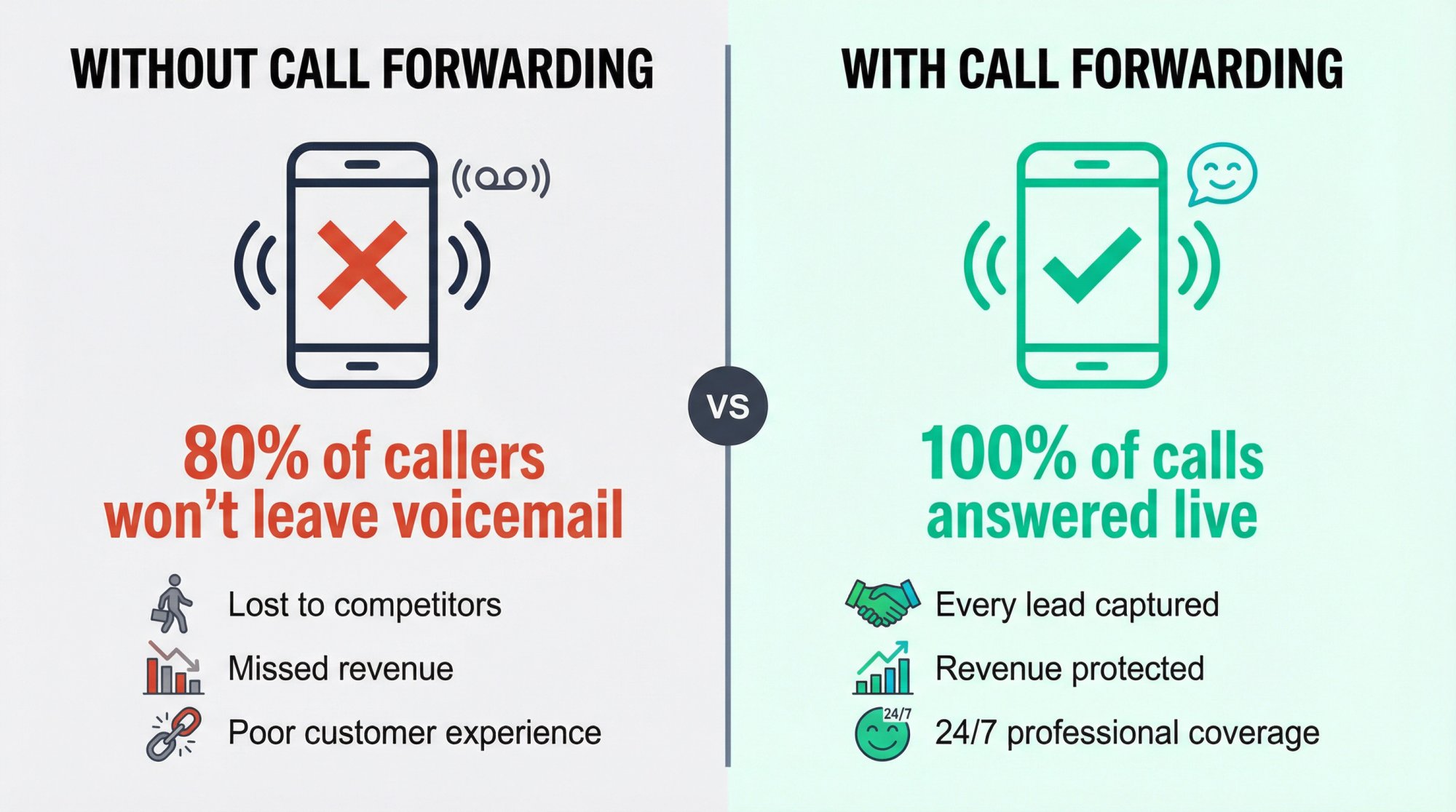
Every business call that goes to voicemail is a potential customer who might just hang up and call your competitor instead. Studies show that up to 80% of callers won't leave a voicemail. They'll just try the next business on their list. Learn more about call forwarding strategies.
When you forward RingCentral calls to an answering service (whether that's a human team or an AI receptionist like Eden), you're ensuring every call gets handled professionally.
The key benefits:
• No more missed leads - Every call gets answered by a real person or intelligent AI
• Better customer experience - Callers hear a friendly voice instead of "please leave a message after the tone"
• 24/7 coverage - Evenings, weekends, holidays, busy periods... all covered
• Peace of mind - Focus on your work knowing calls are handled professionally
The key is setting up forwarding correctly. Too many businesses enable "forward all calls" and wonder why their phone never rings, or they set up conditional forwarding but configure it wrong so calls still hit voicemail.
Which Call Forwarding Strategy Works Best?#
Before touching any settings, you need to decide what you actually want to happen. Most RingCentral forwarding problems happen because businesses choose the wrong strategy for their needs.
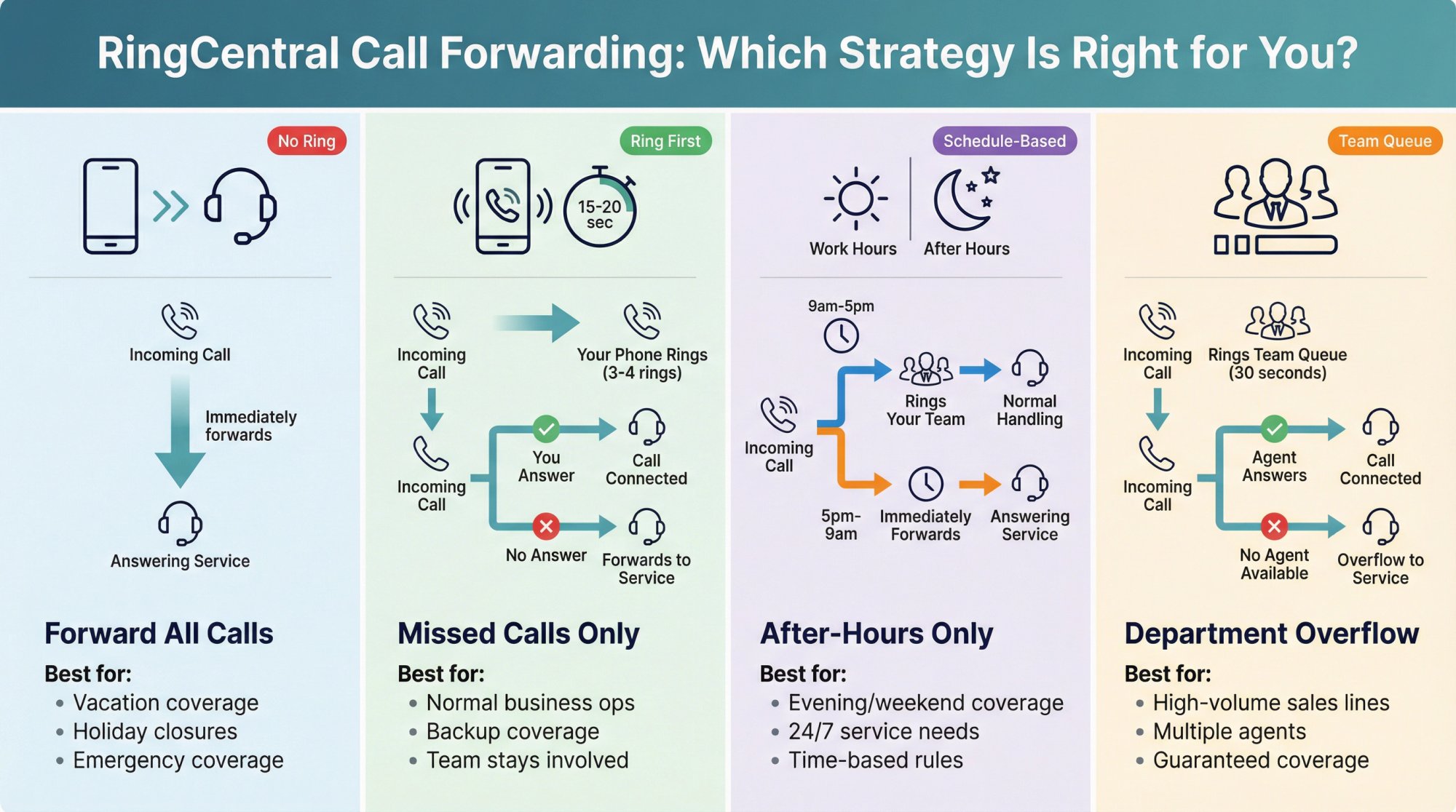
Forward All Calls (When to Use Unconditional Forwarding)#
This sends every incoming call straight to your answering service. Your RingCentral phones won't ring at all. It's like putting a "calls are being handled elsewhere" sign on your line.
| When to use | Perfect for |
|---|---|
| Vacation coverage | Taking time off |
| Holiday closures | Office closed for the week |
| Emergency situations | Want someone else handling 100% of calls |
| Primary answering | Answering service is your main phone answer |
In RingCentral, this appears as Forward all calls in your Call rules.
Forward Only Missed Calls (Conditional Forwarding Setup)#
Your RingCentral line rings first. If you don't answer after a certain number of rings (or if you're on another call), then it forwards to the answering service.
This is what most small businesses actually want. You still get to answer calls when you're free, but there's a safety net catching anything you miss.
Ideal scenarios:
→ Normal business operations - "Try me first, then backup" coverage
→ Keeping your team in the loop - Still take calls when available
→ Ensuring nothing gets missed - Backup coverage when busy
RingCentral handles this through Call handling settings where you configure what happens to missed calls. During normal work hours when you want to take calls yourself, but need coverage when you're busy, in a meeting, or helping another customer.
After-Hours Call Forwarding: When to Enable#
Calls during your business hours behave normally (ring your team). Outside those hours, they forward immediately to your after-hours answering service.
Best for:
-
Evening and weekend coverage
-
Maintaining different behavior during vs. outside business hours
-
Emergency services that need 24/7 coverage
RingCentral supports separate Work hours vs. After hours configurations, so you can set different rules for each. You want to answer calls during the workday, but need every evening, weekend, and holiday call handled by a 24/7 service.
Department Overflow: How Call Queue Forwarding Works#
How it works: This uses RingCentral's call queue feature. Calls ring your team for X seconds, and if nobody picks up, they overflow to your answering service. It's more sophisticated than personal forwarding because you can control exactly how long calls try your team before forwarding out.
✓ Sales teams handling high call volume
✓ Multiple agents need guaranteed coverage
✓ High-volume lines with predictable overflow needs
When to use it: You have a sales line, dispatch number, or department extension where multiple people might answer, and you need a predictable "if nobody gets it in 30 seconds, send to the service" rule.
How to Get Your Answering Service Forwarding Number#
Your answering service will give you a phone number to forward calls to. This might be called your "dedicated number," "forwarding number," or "receptionist number."
Write this number down exactly. One wrong digit sends calls to the wrong place.
If you're using Eden, you'll find your dedicated Eden number in your dashboard after setup. Eden even provides step-by-step forwarding guides for major carriers including RingCentral.
How to Forward All RingCentral Calls: Step-by-Step#
We'll start with the simplest setup: sending every call to your answering service.
Desktop or Web App:
① Open your RingCentral app (desktop or web version)
② Click your profile picture in the top corner
③ Select Call rules
④ Click Forward all calls to enable it
⑤ In the Incoming calls dropdown, choose Forward the call
⑥ Select Number and enter your answering service's 10-digit phone number
⑦ (Optional) Click Add schedule if you only want this active during specific times
⑧ Click Save
Once saved, you'll see a red banner at the top of your RingCentral app reminding you that call forwarding is active.
RingCentral's way of making sure you don't forget it's turned on. This banner is your visual confirmation that all calls are being redirected.
Mobile App:
The process is nearly identical:
-
Tap your profile
-
Go to Call rules
-
Enable Forward all calls
-
Choose the external number
-
Optionally set a schedule
-
Save
Testing it: Call your RingCentral number from a different phone. Your RingCentral devices should not ring. Instead, the call should connect directly to your answering service, and they should answer with your custom greeting.
To turn it off later: Just go back to Call rules and toggle off "Forward all calls." The red banner disappears, and calls will ring your devices normally again.
How to Set Up Missed Call Forwarding in RingCentral#
This is probably what most businesses need: your phone rings first, and only missed calls forward to the service.
Setup Steps:
① Open the RingCentral app
② Go to Settings (left navigation)
③ Select Phone
④ Scroll to Call handling and click Edit
⑤ Under Incoming calls (Work hours section), choose how you want calls to ring:
| Ring Strategy | How it works | Best for |
|---|---|---|
| Ring in order | Rings devices one at a time | Solo professionals with desk phone + mobile |
| Ring all at once | Rings everything simultaneously | Small teams who want fastest answer |
⑥ Set your ring timing (usually 15-25 seconds is ideal)
⑦ Under Missed calls, select Forward to external number
⑧ Enter your answering service's phone number
⑨ Click Save
Now when someone calls:
-
Your RingCentral phone/app rings normally
-
If you answer, great (the call doesn't forward)
-
If you don't answer within the time limit, RingCentral forwards to the service
-
The service picks up and handles it
Pro tip on ring timing: Based on typical caller behavior, forwarding after about 3-4 rings (15-20 seconds) works best. This gives you a chance to answer without making callers wait too long before the service picks up. Learn more about optimal forwarding timing.
Sequential vs Simultaneous Ringing: Which Is Better?#
RingCentral gives you two options for how devices ring:
Ring in order (sequential): Your desk phone rings for 10 seconds. If you don't answer, your mobile rings for 10 seconds. Then it forwards.
Ring all at once (simultaneous): Your desk phone, mobile, and app all ring together. Whoever picks up first gets it.
For most small businesses, simultaneous ringing works better with answering service forwarding. You get a chance to grab it quickly, and if you're not available, it forwards cleanly to the service.
How to Configure After-Hours Forwarding in RingCentral#
Want calls during business hours to work normally, but after-hours calls to go straight to your service? RingCentral makes this easy.
Important: This only works if you have a custom schedule set up. If your RingCentral schedule is 24/7, there's no "after hours" to configure.
Steps:
① Go to Settings > Phone > Call handling
② Click Edit Schedule to set your business hours (e.g., 9am-5pm Monday-Friday)
③ Configure After hours behavior:
-
Choose Forward to external number
-
Enter your answering service number
-
Save
Now RingCentral knows: during work hours, handle calls normally. Outside those hours, forward everything immediately.
Best practice: For after-hours, don't make it ring multiple people for 60 seconds before forwarding. Set it to forward immediately or ring just one on-call person briefly, then forward. The goal is getting callers to a live answer quickly, not exhausting every option first.
How to Forward Your Company Main Number#
Many businesses have a "main line" that's separate from individual extensions. Here's how to handle that.
The cleanest approach:
① Route your company main number to a specific extension (like a "front desk" or "reception" extension)
② On that extension, set up call handling so missed calls or after-hours calls forward to your service
This keeps your routing logic in one place instead of scattered across multiple extensions.
To configure this:
-
In RingCentral app, go to Company setup
-
Click Calls
-
Under Call routing, click Edit
-
Configure what happens during business hours and after hours
-
Save
Department Overflow Setup: Call Queue Forwarding#
If you have a sales team or multiple people handling one line, you need overflow forwarding.
The goal: Calls try your team for 20-30 seconds, and if nobody answers, they overflow to your answering service automatically.
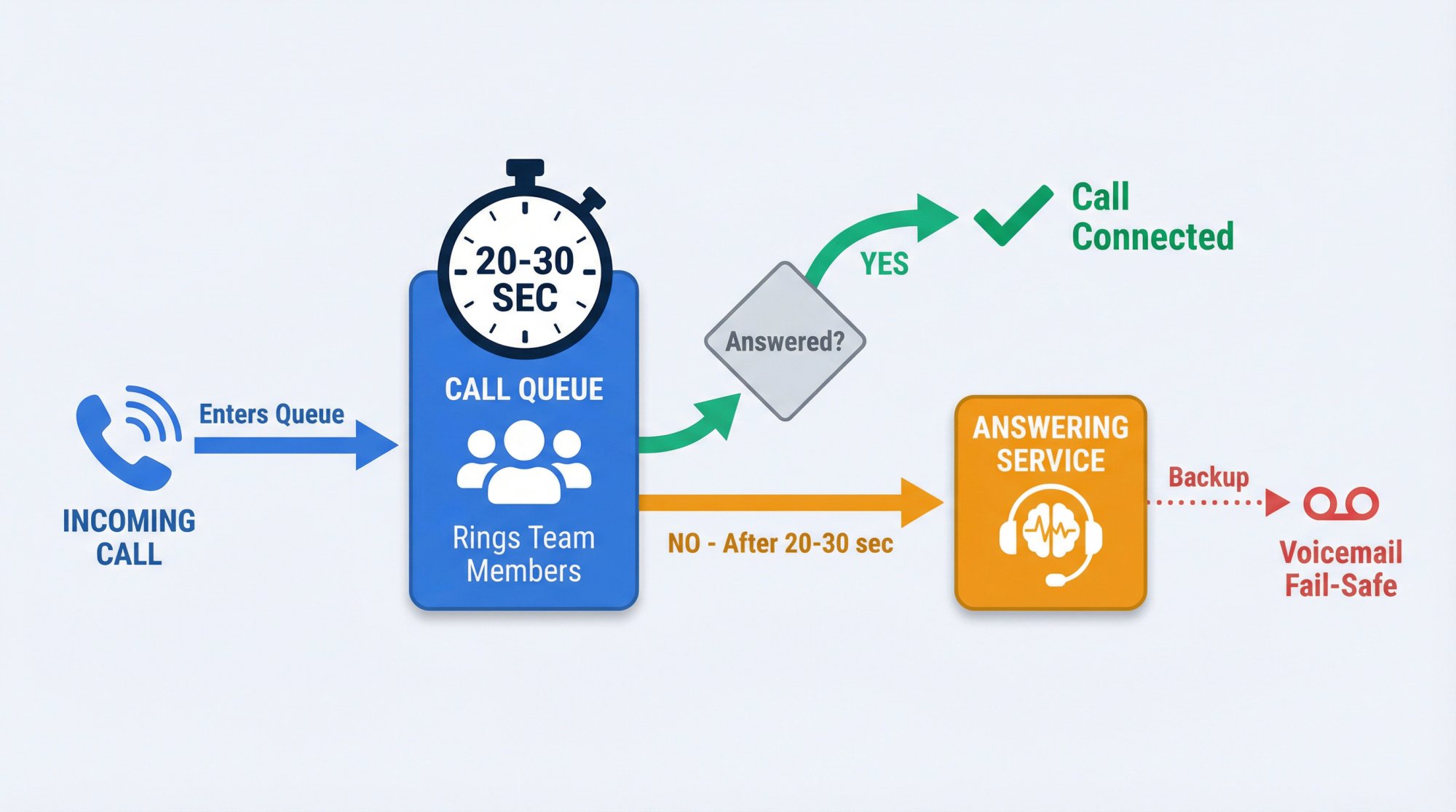
How it works:
Create a call queue in RingCentral that:
-
Rings your team members for a set time
-
If nobody answers, routes to an external number (your answering service)
-
Has a fail-safe (voicemail or backup) if somehow the service doesn't answer either
This is more technical than most small businesses need, but if you're serious about never missing sales calls, it's worth setting up.
How to Test Your Call Forwarding Setup (Critical Step)#
Most forwarding problems are configuration conflicts you can catch in 10 minutes of testing.
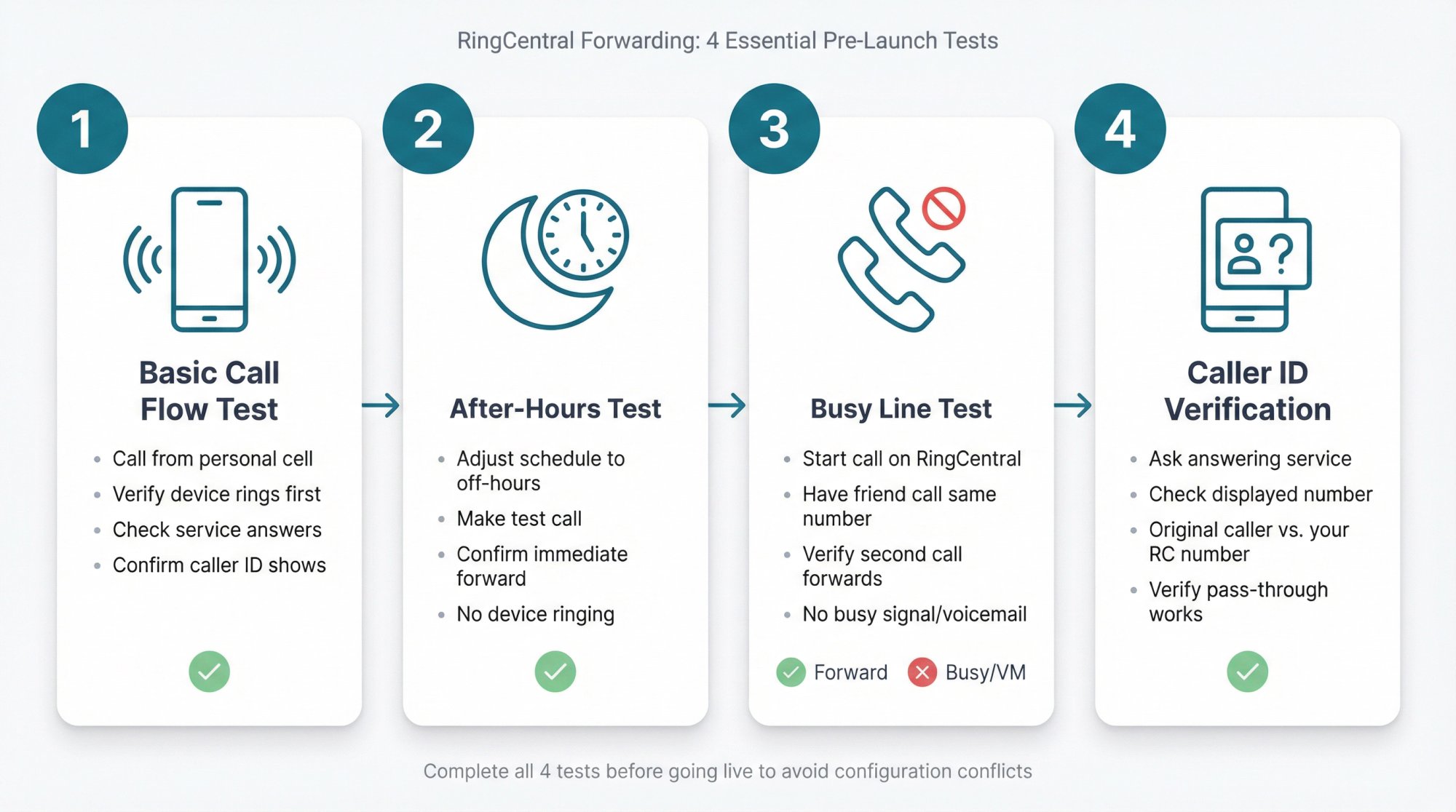
Test 1: Basic Call Flow#
Call your RingCentral number from:
-
Your personal cell phone
-
A friend's phone (or second number)
Verify:
-
Does it ring the right devices first?
-
Does it forward when it should?
-
Does the answering service answer correctly?
-
Do they see the original caller's phone number?
Test 2: After-Hours Behavior#
If you set up after-hours forwarding, test it:
-
Temporarily adjust your schedule so "after hours" is right now
-
Make a test call
-
Confirm it forwards immediately without ringing your devices
Test 3: Busy Line Scenario#
If you're already on a RingCentral call, have someone else call your number.
Does the second call:
✓ Forward to the service? (ideal)
✗ Give a busy signal? (bad)
✗ Go to voicemail? (also bad)
This helps you catch "call waiting" or "busy forwarding" configuration issues.
Test 4: Caller ID Pass-Through#
Ask your answering service: "When calls forward from RingCentral, do you see the original caller's number, or do you see my RingCentral number?"
If they only see your number, callers might have a harder time getting callbacks. Most RingCentral setups pass through caller ID correctly, but it's worth verifying.
Do Text Messages Forward with RingCentral Calls?#
This surprises many businesses: RingCentral call forwarding only forwards voice calls, not SMS messages.
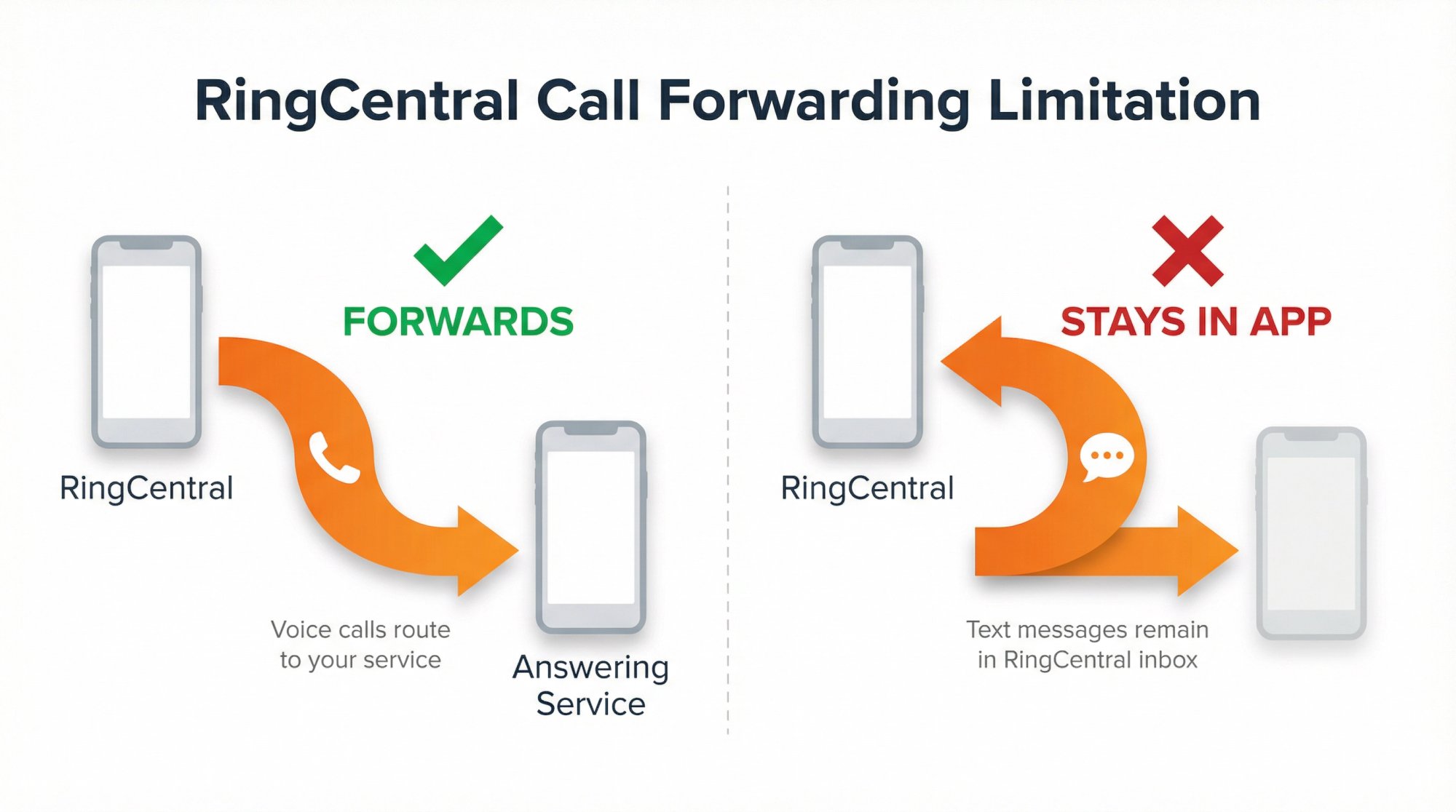
Text messages sent to your RingCentral number stay in your RingCentral inbox. They won't forward to your answering service's number.
What this means: Even if you forward calls perfectly, you still need to monitor your RingCentral app for incoming texts. If text capture matters to your business, build a process for checking it regularly.
RingCentral Call Forwarding Costs: What to Expect#
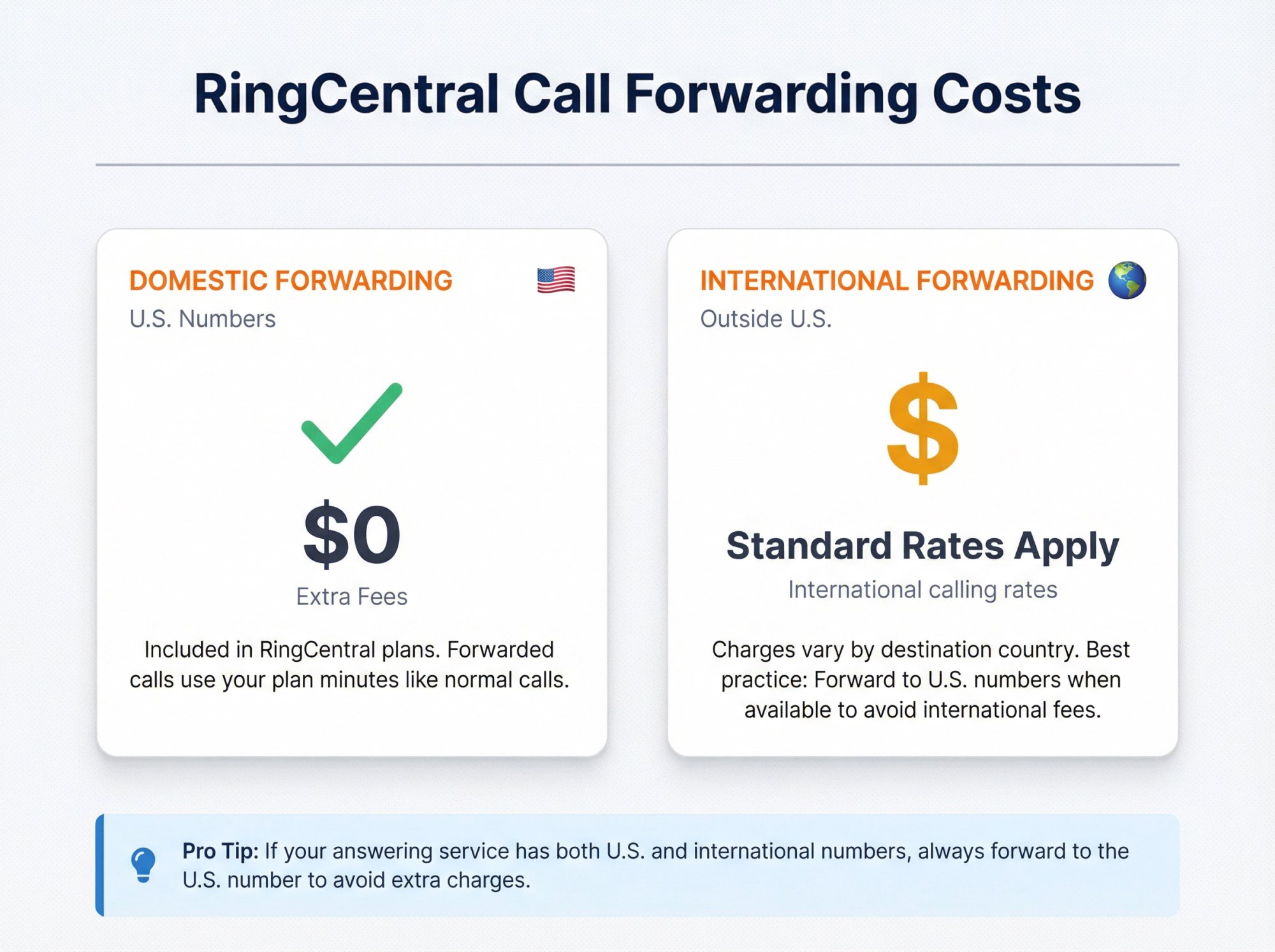
| Forwarding Type | Cost |
|---|---|
| Domestic (U.S. number) | No extra fees - included in RingCentral plans |
| International | International calling rates apply |
Domestic forwarding: RingCentral doesn't charge extra fees to forward calls to a U.S. phone number. Call forwarding is included in RingCentral plans. Forwarded calls use your plan minutes like normal calls would.
International forwarding: If you're forwarding to an international number, international calling rates apply.
Best practice for international: If your answering service is overseas, it's often cheaper to forward to their U.S. number (if they have one) rather than forwarding directly to an international destination.
Common RingCentral Forwarding Problems and Fixes#
Problem: Voicemail Picks Up Before the Service#
You set up forwarding, but calls still go to RingCentral voicemail.
The fix: Check your voicemail settings. If voicemail is set to pick up after 4 rings and your forwarding triggers after 5 rings, voicemail wins. When using conditional forwarding, make sure the "Missed calls" action is set to forward instead of voicemail, not in addition to it.
Problem: Wrong Ring Duration#
Calls forward too quickly (you never get a chance to answer) or too slowly (callers hang up before the service picks up).
The fix: Experience shows that 15-20 seconds (3-4 rings) is the sweet spot. It gives you a chance to grab the call without making customers wait so long they give up. See forwarding best practices.
Problem: Conflicting Call Handling Rules#
You have multiple call handling rules that contradict each other.
If you enable "Forward all calls" but also have call handling rules set up, the "Forward all calls" typically overrides everything else. Turn off any temporary forwarding toggles if you want your normal call handling rules to work.
Problem: After-Hours Forwarding Not Working#
After-hours forwarding looks set up, but it doesn't actually work when you're closed.
The fix: Temporarily change your schedule so "after hours" is right now. Test a call. Many businesses discover their after-hours configuration wasn't actually saved or was overridden by another setting.
RingCentral to Eden AI Receptionist Setup#
Eden works through call forwarding: you keep your RingCentral number, and RingCentral forwards calls to Eden under whatever conditions you choose.
Common Eden + RingCentral setups:
✦ Option 1: Forward missed calls during work hours
Your RingCentral rings first. If you don't answer, Eden picks up. Eden answers with your custom greeting, can book appointments, transfer urgent calls, or take messages.
✦ Option 2: Forward all after-hours calls
During business hours: you handle calls normally. Outside business hours: Eden answers everything. Ensures 24/7 coverage without you being on-call.
✦ Option 3: Forward all calls (vacation coverage)
Toggle this on when you're out. Every call goes to Eden. Toggle it off when you're back.
Eden provides detailed call forwarding guides for RingCentral and other major carriers, and the setup process usually takes less than 10 minutes.
Real-World Call Flow Examples#
Flow 1: Solo Professional (Attorney, Consultant, Accountant)#
| Element | Configuration |
|---|---|
| Work hours | RingCentral app + mobile ring for 20 seconds |
| Missed calls | Forward to answering service |
| After hours | Forward immediately |
| Fail-safe | Voicemail if service doesn't answer |
Why it works: You get first crack at every call during the day, but if you're with a client or in a meeting, the service catches it. Evenings and weekends go straight to the service so you're not tied to your phone.
Industry-specific solutions:
Flow 2: Home Services (Plumber, HVAC, Electrician)#
During business hours, dispatch and owner get 15 seconds to answer. After hours, everything forwards immediately to the service. Emergency calls get transferred to the on-call tech's mobile.
Why it works:
→ Your team gets calls when they're available
→ Emergency calls after hours get transferred to whoever's on-call
→ Everything else gets captured for follow-up the next day
Industry-specific solutions:
Flow 3: Sales Team or Agency#
The call queue rings the sales team for 30 seconds. If nobody picks up, the call overflows to the answering service for lead capture. The service collects contact info, qualifies the lead, and books a callback. If somehow the service doesn't answer either, there's a voicemail with an urgent callback request.
This approach gives your team a full 30 seconds to grab incoming leads. If everyone's busy, the answering service ensures the lead doesn't just disappear. Every caller gets a real person or at least a solid message-taking experience.
Frequently Asked Questions#
Frequently Asked Questions#
Does RingCentral charge extra for call forwarding?
No. Call forwarding to U.S. numbers is included in RingCentral plans. You don't pay extra fees for the forwarding feature itself. Forwarded calls use your plan minutes like any other call.
Will my phone still ring when calls are forwarded?
It depends on your setup:
-
Unconditional forwarding (Forward all calls): Your phone won't ring. Calls go straight to the service.
-
Conditional forwarding (Missed calls): Your phone rings first. Only unanswered calls forward.
-
Simultaneous ringing: You can have both your phone and the service ring at once. Whoever answers first gets the call.
Can I forward to multiple numbers?
Yes. RingCentral supports forwarding to up to 10 numbers. You can have calls ring in order (one after another) or all at once (simultaneous).
Most businesses forwarding to an answering service use one of these patterns:
-
Ring your devices, then forward to service (sequential)
-
Ring your devices and service at the same time (simultaneous)
How do I make sure RingCentral voicemail doesn't pick up before the answering service?
When you set conditional forwarding via the "Missed calls" setting, RingCentral sends unanswered calls to the external number instead of voicemail. Make sure you're choosing "Forward to external number" in the Missed calls action, not just adding it to the ring list.
If calls still hit voicemail, check that you don't have competing voicemail rules that trigger earlier than your forwarding. Learn more about avoiding voicemail issues.
What happens if the answering service doesn't pick up?
You should configure a fail-safe. In RingCentral, your options include:
-
Send to voicemail
-
Play a message and disconnect
-
Forward to another extension or backup number
Most businesses choose voicemail as the final fallback, but the goal is to configure forwarding so reliably that this rarely happens.
Can I forward calls from specific numbers to different places?
Yes, but it requires more advanced setup. You could, for example, send VIP clients to your cell phone and everyone else to the answering service.
This is beyond basic forwarding, but RingCentral's call handling system supports quite sophisticated routing if you need it.
Will callers know they were forwarded?
Generally, no. The caller dials your RingCentral number. When forwarding happens, they might hear a brief click or an extra ring, but they won't hear "you are being forwarded" or anything like that.
The answering service answers with your custom greeting, so from the caller's perspective, they're still talking to your business. It's seamless.
Can I turn forwarding on and off quickly?
Yes. The "Forward all calls" toggle in Call rules can be turned on/off with just a few clicks. Once you've entered your answering service number the first time, enabling and disabling forwarding is fast.
This is handy for situations like: "I'm going into a 3-hour meeting, let me enable forwarding" or "Back from vacation, let me turn forwarding off."
Does call forwarding work with RingCentral's auto-attendant?
Yes, but you need to think about the flow. If you have an auto-attendant (IVR) that answers calls first, you'd typically set up forwarding on the extensions that the auto-attendant routes to, not on the main number itself.
For example:
-
Main number goes to auto-attendant
-
"Press 1 for Sales" routes to sales extension
-
Sales extension has call handling rules that forward missed calls to the service
What if I need to forward different departments to different answering services?
Set up forwarding on each department's extension individually. Each extension can have its own call handling rules and forwarding destinations.
This way, sales calls can forward to one service, support calls to another, or different lines can have different forwarding behaviors entirely. Explore all answering service solutions to find what works for each department.
Next Steps: Get Your RingCentral Forwarding Live#
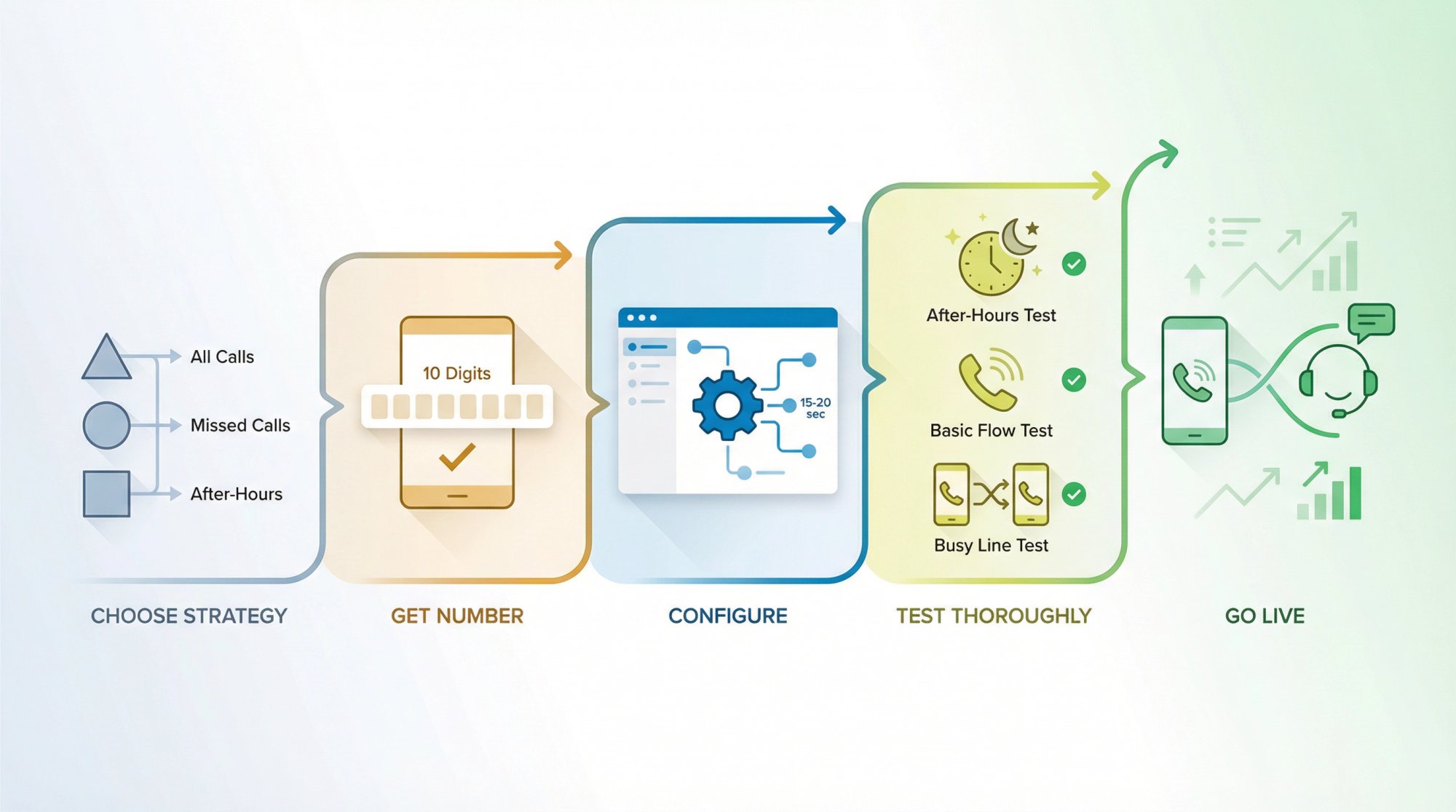
Setting up RingCentral call forwarding to an answering service isn't complicated, but it needs to be done right. Here's your action plan:
→ Step 1: Decide which forwarding strategy matches your needs (all calls, missed calls only, or after-hours only?)
→ Step 2: Get your answering service's forwarding number (write it down exactly - 10 digits, no mistakes)
→ Step 3: Configure forwarding in RingCentral (use the exact steps for your chosen strategy above; set appropriate ring timings - 15-20 seconds is usually ideal)
→ Step 4: Test thoroughly before going live (test during work hours, test after hours, test busy scenarios, confirm caller ID passes through)
→ Step 5: Monitor and adjust (check in after the first week; ask your answering service how calls are coming through; adjust timing or routing if needed)
Once it's set up correctly, you'll never worry about missed calls again. Your customers get answered promptly, you capture every lead, and you can focus on your work instead of being chained to your phone.
Whether you're forwarding to a human answering service or an AI receptionist like Eden, the RingCentral setup process is the same. The difference is in what happens after the call forwards, which is where the right answering service makes all the difference.
Ready to Transform YourCustomer Experience?
Join hundreds of businesses using Eden AI to handle calls, book appointments, and provide 24/7 customer support.